FSC-BT1058 Audio Transmit & Receive AT Command Set
Introduction
Release Note
序号 |
版本 |
日期 |
说明 |
1
|
V1.0.0
|
2024/05/23
|
1. Initial version
|
2
|
V1.0.1
|
2024/07/09
|
1. Added some LE Audio related commands and Events
2. Added some GATTS related commands and Events
3. Fix known issues
|
3
|
V1.0.2
|
2025/01/07
|
1. Fix known issues
2. Added some commands and events
|
4
|
V2.0.0
|
2026/01/08
|
1. Added audio source-sink integrated mode
2. Added some commands and events
|
Description
This design guide is suitable for engineers to develop FSC-BT1058 series bluetooth modules
Module Default Settings
BR/EDR Name |
FSC-BT1058 |
BLE Name |
FSC-BT1058-LE |
UART configuration |
115200/8/N/1 |
Hardware description
Pin diagram
FSC-BT1058 as an example:
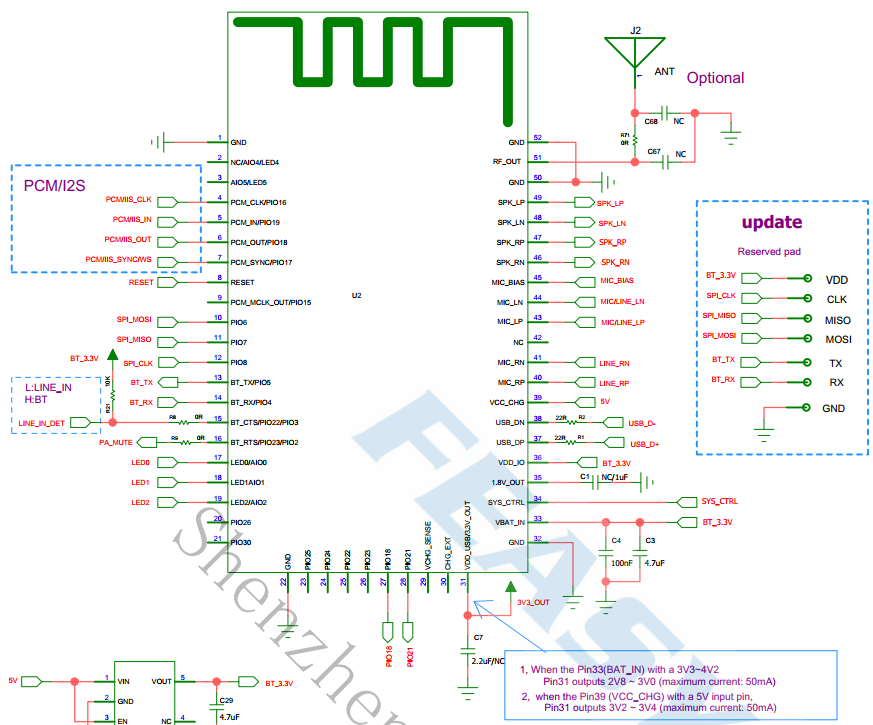
Pin description
PIN |
Name |
Type |
Descriptions |
|---|---|---|---|
4 |
I2S_CLK |
I/O |
I2S BCLK |
5 |
I2S_IN |
I |
I2S DATA IN |
6 |
I2S_OUT |
O |
I2S DATA OUT |
7 |
I2S_WS |
I/O |
I2S SYNC |
8 |
RESET |
I |
Low-level reset |
13 |
UART_TX |
O |
UART_TX |
14 |
UART_RX |
I |
UART_RX |
15 |
SPDIF_OUT |
I/O |
SPDIF audio output |
16 |
UART_RTS |
I/O |
UART flow control pin (default PA) |
17 |
LED0 |
I/O |
Outputs square wave in pairing mode,
Outputs high level when Bluetooth is connected
|
18 |
LED1 |
I/O |
Outputs low level when BLE is disconnected,
Outputs high level when connected
|
32 |
GND |
GND |
GND |
33 |
VDD |
VDD |
3.3V power supply,
LDO power supply is recommended
|
34 |
VREG_IN |
I |
Power on/off pin |
36 |
VDD_IO |
I |
Pio supply |
43 |
MIC_LP |
Audio |
MIC0/Line_IN differential L input, positive |
44 |
MIC_LN |
Audio |
MIC0/Line_IN differential L input, negative |
45 |
MIC_BIAS |
Audio |
MIC Power Supplies |
46 |
SPK_RN |
Audio |
Headphone/speaker differential R output, negative |
47 |
SPK_RP |
Audio |
Headphone/speaker differential R output, positive |
48 |
SPK_LN |
Audio |
Headphone/speaker differential L output, negative |
49 |
SPK_LP |
Audio |
Headphone/speaker differential L output, positive |
51 |
EXT_ANT |
ANT |
Change the 0-ohm resistor near the antenna to connect an external Bluetooth antenna |
Hardware design notes
The simple test of the module only needs to connect VDD/VDD_IO/VBUS/GND/UART_RX/UART_TX to use
After drawing, please send it to feasy.com for review so as not to have the best bluetooth distance
Functional Notes
Profiles & Features
SPP (Serial Port Profile)
GATTS (Generic Attribute Profile LE-Peripheral)
GATTC (Generic Attribute Profile LE-Central)
HFP-HF (Hands-Free Profile)
HFP-AG (Hands-Free-AG Profile)
A2DP-SINK (Advanced Audio Distribution Profile, Sink)
A2DP-SOURCE (Advanced Audio Distribution Profile, Source)
AVRCP-CONTROLLER (Audio/Video Remote Control Profile, Controller)
AVRCP-TARGET (Audio/Video Remote Control Profile, Target)
HID-DEVICE (Human Interface Profile)
PBAP (Phonebook Access Profile)
LE-AUDIO (Le Audio Profile)
GATT Service
Type |
UUID |
Characteristic |
Description |
Service |
0xFFF0 |
Throughout Service |
|
Write |
0xFFF2 |
Write,
Write Without Response
|
From APP to Module |
Notify |
0xFFF1 |
Notify |
From Module to APP |
Command Description
Terms
Applicable to the entire document.
{}: Content within {…} is optional.
<<: COMMAND sent from the Host to the Module.
>>: RESPONSE/EVENT replied from the Module to the Host.
Command Format
AT+Command{=Param1{,Param2{,Param3...}}}<CR><LF>
All commands start with
AT+, end with<CR><LF><CR>means "carriage return", corresponds to hex value0x0D<LF>means "line feed", corresponds to hex value0x0AIf command has param, param follows behind
=If command has multiple params, param must be separated by
,If command has response, response starts with
<CR><LF>, ends with<CR><LF>Module will always report command's execution result by using
OKfor success orERRORfor failure
Event Format
<CR><LF>+Event{=Param1{,Param2{,Param3...}}}<CR><LF>
All events start with
<CR><LF>, end with<CR><LF>If event has param, param follow behind
=If event has multiple params, param must be separated by
,
Commands table
General Commands
AT+HELP - List firmware information and all support command
Command |
AT+HELP |
Response |
<COMMAND SUMMARY:DESCRIPTION:PROFILE CATEGORY>
...
...
|
AT+VER - Get firmware version information
Command |
AT+VER |
Response |
+VER=Param1,Param2,Param3 |
Description |
AT+BAUD - Get/Set uart baudrate
Command |
AT+BAUD{=Param} |
|
9600/ 19200/ 38400/ 57600/ 115200/ 230400/ 460800
500000/ 921600/ 1000000/ 1382400/ 1500000/ 2000000
|
Response |
+BAUD=Param |
|
Current baudrate |
Description |
It takes effect immediately and does not need to be restarted |
AT+MODCFG - Set Device Source-Sink Mode
Command |
AT+MODCFG{=Param} |
|
0-Sink mode for audio reception
1-Source mode for audio transmission
|
Description |
AT+I2SCFG - Get/Set I2S Configuration
Command |
AT+I2SCFG{=Param} |
|
A base-10 representation of a bit field, for each bit |
|
0: Disable
1: Enable
|
|
0: Master mode
1: Slave mode
|
|
0: 48000Hz sampling rate
1: 44100Hz sampling rate
|
|
0: Data left-aligned
1: Data right-aligned
|
|
0: Data delayed by 1 bit
1: No data delay
|
|
00: 16-bit sampling depth
01: 24-bit sampling depth
|
Response |
+I2SCFG=Param |
|
Current I2S configuration, formatted as above |
Description |
Takes effect after restart |
AT+SPDIFCFG - SPDIF Format Configuration (Valid for audio sink)
Command |
AT+SPDIFCFG{=Param} |
|
0-Disable audio output in SPDIF format
1-Enable audio output in SPDIF format
|
Description |
If audio output is SPDIF, the I2S configuration will be invalid. |
AT+SPKVOL - Set Speaker Volume (Valid for audio sink)
Command |
AT+SPKVOL{=Param} |
|
Volume ('+' / '-'/ 0-15, default:15) |
Description |
Adjust output volume,
Adjust A2DP volume during music playback,
Adjust HFP volume during calls,
And also support volume adjustment in LEA mode.
|
AT+MICGAIN - Get/Set input gain (Valid for audio source)
Command |
AT+MICGAIN{=Param} |
|
0 ~ 10: Set target value
+: Increase gain
-: Decrease gain
|
Response |
+MICGAIN=Param |
|
Current input gain |
Description |
In USB input mode, the param only be +/-, and get the param is invalid
In I2S/SPDIF input mode, this command is invalid
|
AT+REBOOT - Soft reboot
Command |
AT+REBOOT |
Description |
Module will disconnect all profiles then reboot |
AT+RESTORE - Restore factory settings
Command |
AT+RESTORE |
Description |
Module restore all factory settings then reboot |
AT+BTEN - Get/Set bluetooth state
Command |
AT+BTEN{=Param} |
|
0: Bluetooth off
1: Bluetooth on
|
Response |
+BTEN=Param |
|
Current bluetooth state |
AT+LECFG - Get/Set random BLE address state
Command |
AT+LECFG{=Param} |
|
0: Disable
1: Enable
|
Response |
+LECFG=Param |
|
Current state |
AT+PROFILE - Get/Set Bluetooth profile
Command |
AT+PROFILE{=Param} |
|
A base-10 representation of a bit field, for each bit: |
|
SPP (Serial Port Profile) |
|
GATT Server (Generic Attribute Profile) |
|
GATT Client (Generic Attribute Profile) |
|
HFP-HF (Hands-Free Profile Handsfree) |
|
HFP-AG (Hands-Free Profile Audio Gateway) |
|
A2DP Sink (Advanced Audio Distribution Profile) |
|
A2DP Source (Advanced Audio Distribution Profile) |
|
AVRCP Controller (Audio/Video remote controller Profile) |
|
AVRCP Target (Audio/Video remote controller Profile) |
|
HID-DEVICE (Human Interface Device Profile) |
|
PBAP (Phonebook Access Profile) |
|
MAP (Message Access Profile) |
|
LE AUDIO BIS-SINK (Low Energy Audio Broadcast Isochronous Stream Sink) |
|
LE AUDIO BIS-SOURCE (Low Energy Audio Broadcast Isochronous Stream Source) |
|
LE AUDIO CIS-SINK (Low Energy Audio Connected Isochronous Stream Sink) |
|
LE AUDIO CIS-SOURCE (Low Energy Audio Connected Isochronous Stream Source) |
Response |
+PROFILE=Param |
|
Currently used profiles |
Description |
Modify the configuration, the module restarts automatically
Audio sink uses configurations: SPP, GATTS, HFP-HF, A2DP-SINK, AVRCP-CONTROLLER, LE AUDIO BIS-SINK, LE AUDIO CIS-SINK
Audio source uses configurations: SPP, GATTS, GATTC, HFP-AG, A2DP-SOURCE, AVRCP-TARGET, LE AUDIO BIS-SOURCE, LE AUDIO CIS-SOURCE
HID, PBAP, MAP are currently reserved and their functions are not yet implemented
|
AT+AUTOCONN - Get/Set the count of auto-reconnection on power-on
Command |
AT+AUTOCONN{=Param} |
|
0: Disable
1 ~ 15: Reconnect times
|
Response |
+AUTOCONN=Param |
|
Current auto reconnect configuration |
Description |
In Le Audio, the setting will be invalidated |
AT+STAT - Get all state
Command |
AT+STAT |
Response |
+STAT=Param1,Param2,Param3,Param4,Param5,Param6,Param7,Param8 |
|
|
|
|
|
|
|
|
|
|
|
|
|
|
|
AT+DEVSTAT - Get device state
Command |
AT+DEVSTAT |
Response |
+DEVSTAT=Param |
|
AT+ADDR - Get BR/EDR MAC address
Command |
AT+ADDR |
Response |
+ADDR=Param |
|
Module's BR/EDR MAC address(12 bytes ASCII) |
AT+LEADDR - Get BLE MAC address
Command |
AT+LEADDR |
Response |
+LEADDR=Param |
|
Module's LE MAC address(12 bytes ASCII) |
AT+NAME - Get/Set BR/EDR name
Command |
AT+NAME{=Param1{,Param2}} |
|
BR/EDR name |
|
0: Disable suffix
1: Enable suffix“XXXX”(lower 4 bytes of MAC address) after name
|
Response |
+NAME=Param |
|
BR/EDR name |
Description |
The configured name shall not exceed 31 bytes in maximum. |
AT+LENAME - Get/Set BLE name
Command |
AT+LENAME{=Param1{,Param2}} |
|
BLE name |
Param2 |
0: Disable suffix
1: Enable suffix“XXXX”(lower 4 bytes of MAC address) after name
|
Response |
+LENAME=Param |
|
BLE name |
Description |
The configured name shall not exceed 31 bytes in maximum. |
AT+SSP - Read/Write BR/EDR Pairing Mode (Valid for sink)
Command |
AT+SSP{=Param} |
|
Pairing mode (0~2, default:1)
(0) Legacy pairing, use pin code for pairing
(1) Secure simple pairing, auto pairing
(2) Secure simple pairing, display yes/no in pairing
|
Description |
BT1058 features Bluetooth 5.4 + LEA. BT1038 & BT1058 series do not support SSP=0 parameter. |
Response |
+SSP=Param |
Description |
Need reboot. |
AT+COD - Get/Set class of device
Command |
AT+COD=Param |
|
Class of device(6 bytes ASCII) |
Response |
+COD=Param |
|
Current class of device |
Description |
Class of device reference COD |
AT+PAIR - Get/Set Bluetooth Discoverability
Command |
AT+PAIR=Param |
|
0: Exit BR/EDR discoverable mode
1: Enter BR/EDR discoverable mode
|
Response |
+PAIR=Param |
|
Current Bluetooth Discoverability |
AT+SCAN - Scan Nearby Devices
Command |
AT+SCAN=Param1{,Param2}{,Param3} |
|
0: Stop scanning
1: Scan BR/EDR devices
2: Scan LE devices
3: Scan Le Audio Broadcast audio
|
|
Scanning time, maximum 255 (Unit: second) |
|
When Param1 is 2 and 3: 0: LE report format is the same as BR/EDR
When Param1 is 2 and 3: 1: LE reports original broadcast data
When Param1 is 2 and 3: 2: Only report devices that support Le Audio
When Parameter1 is 1: Parameter3 is the filtered scanned device name
|
Description |
AT+PLIST - Get/Delete paired list
Command |
AT+PLIST{=Param} |
|
0: Clear all paired record
1 ~ 8: Clear specific paired record with index
MAC(12 bytes ASCII): Clear specific paired record with MAC address
|
Response1 |
+PLIST=Param1, Param2{,Param3} |
|
Paired device's index |
|
Paired device's MAC address |
|
Paired device's name(UTF8) |
Response2 |
+PLIST=E |
Description |
If param not exist then list all paired devices |
AT+DSCA - Release all connections
Command |
AT+DSCA |
Description |
This command only initiates a disconnect request
The actual status depends on the query
|
AT+TPMODE - Get/Set throughput mode
Command |
AT+TPMODE{=Param} |
|
0: Disable
1: Enable
|
Response |
+TPMODE=Param |
|
Current throughput mode |
Description |
When SPP/GATT profile connected and throughput mode is on
The command will be de-active, every byte received via physical UART will be sent to air
|
AT+AUXCFG - Get/Set audio input mode
Command |
AT+AUXCFG{=Param} |
|
0: USB
1: Analog
2: SPDIF
3: I2S
|
Response |
+AUXCFG=Param |
|
Current audio input mode |
Description |
It takes effect after the restart
In le audio only support usb and analog
|
AT+LINKKEY - Get remote device link key
Command |
AT+LINKKEY=Param |
|
MAC address of target device(12 bytes ASCII) |
Response |
+LINKKEY=Param1,Param2 |
|
MAC address of target device(12 bytes ASCII) |
|
Target device's link key(32 bytes ASCII) |
AT+RSSI - Get remote device rssi
Command |
AT+RSSI=Param |
|
MAC address of target device(12 bytes ASCII) |
Response |
+RSSI=Param1,Param2 |
|
MAC address of target device(12 bytes ASCII) |
|
Target device's RSSI |
Description |
If 0 is response, the acquisition failed |
AT+LINKCFG - Get/Set Auto Scan and Connection (Valid for source)
Command |
AT+LINKCFG{=Param1{,Param2}} |
|
0: Disable
1: Enable
|
|
0: Scan all devices
1: Only scan devices with audio as the primary service
|
AT+AUDMODE - Get/Set Bluetooth Audio Mode (Valid for source)
Command |
AT+AUDMODE{=Param} |
|
0: BR/EDR mode
1: Le Audio Broadcast mode
2: Le Audio Unicast mode
|
Description |
Change this setting module will reboot |
AT+PRINT - Get/Set report mode
Command |
AT+PRINT{=Param} |
|
0: Disable
1: Enable
|
Description |
On/Off module actively report a message |
AT+MICMUTE - Mute MIC (Valid for sink)
Command |
AT+MICMUTE=Param |
|
0-Unmute
1-Mute
|
Description |
Mute the local mic during a call |
AT+SPKMUTE - Mute Speaker (Valid for sink)
Command |
AT+SPKMUTE=Param |
|
0-Unmute
1-Mute
|
HFP Commands
AT+HFPSTAT - Get HFP state
Command |
AT+HFPSTAT |
Response |
+HFPSTAT=Param |
|
AT+HFPCONN - Establish HFP connection
Command |
AT+HFPCONN{=Param} |
|
MAC address of target device(12 bytes ASCII) |
Description |
Reconnect to last HFP device if param not exist |
AT+HFPDISC - Release HFP connection
Command |
AT+HFPDISC |
Description |
This command only initiates a disconnect request
The actual status depends on the query
|
AT+HFPRING - Simulate incoming call (Valid for source)
Command |
AT+HFPRING{=Param} |
|
Phone number(ASCII) |
Description |
The phone number contains a maximum of 15 bytes
Dial specific number if parameter exist, otherwise redial
|
AT+HFPANSW - Pick up incoming call
Command |
AT+HFPANSW |
AT+HFPCHUP - Reject/Hung up call
Command |
AT+HFPCHUP |
AT+HFPAUDIO - Establish/Release voice audio(Valid for source)
Command |
AT+HFPAUDIO=Param |
|
0: Release voice audio connection with remote hfp sink device
1: Establish voice audio connection with remote hfp sink device
|
AT+HFPWBS - Get/Set HFP codec negotiation(Valid for source)
Command |
AT+HFPWBS{=Param} |
|
0: Disable HFP codec negotiation
1: Enable HFP codec negotiation
|
Response |
+HFPWBS=Param |
Param |
Current state |
AT+HFPNREC - Get/Set HFP CVC
Command |
AT+HFPNREC{=Param} |
|
0: Disable HFP CVC
1: Enable HFP CVC
|
Response |
+HFPNREC=Param |
Param |
Current state |
AT+HFPDIAL - Redial/Dial Phone Number (Valid for sink)
Command |
AT+HFPDIAL{=Param} |
|
Phone number (1~25 Bytes ASCII) |
Description |
If the parameter exists, dial the specified number, otherwise, redial. |
AT+HFPDTMF - Send DTMF (Valid for sink)
Command |
AT+HFPDTMF{=Param} |
|
DTMF (0~9/#/*) |
AT+HFPADTS - Voice Switch (Valid for sink)
Command |
AT+HFPADTS=Param |
|
0: Transfer voice audio from the module to the remote device
1: Transfer voice audio from the remote device to the module
|
Description |
If the parameter is omitted, switch alternately |
AT+HFPVR - Start/Stop Voice Recognition of Remote Device (Valid for sink)
Command |
AT+HFPVR=Param |
|
0-Stop
1-Start
|
Description |
Start/Stop voice recognition of the remote device (e.g., Siri on iOS devices) |
AT+HFPSCO - SCO Configuration (Valid for sink)
Command |
AT+HFPSCO=Param |
|
0-default
1-always to HF
2-always to AG
|
AT+HFPBATT - Send Device Battery Level (Valid for sink)
Command |
AT+HFPBATT=Param |
|
level(0-9) |
A2DP/AVRCP Commands
AT+A2DPSTAT - Get A2DP state
Command |
AT+A2DPSTAT |
Response |
+A2DPSTAT=Param |
|
AT+A2DPCONN - Establish A2DP connection
Command |
AT+A2DPCONN{=Param} |
|
MAC address of target device(12 bytes ASCII) |
Description |
Reconnect to last A2DP device if parameter not exist |
AT+A2DPDISC - Release A2DP connection
Command |
AT+A2DPDISC |
Description |
This command only initiates a disconnect request
The actual status depends on the query
|
AT+A2DPCFG - Get/Set A2DP configuration
Command |
AT+A2DPCFG{=Param} |
|
A base-10 representation of a bit field, for each bit |
|
0: Disable AAC
1: Enable AAC
|
|
0: Disable APTX
1: Enable APTX
|
|
0: Disable APTX-LL
1: Enable APTX-LL
|
|
0: Disable APTX-HD
1: Enable APTX-HD
|
|
0: Disable APTX-AD
1: Enable APTX-AD
|
|
0: Disable LDAC
1: Enable LDAC
|
Response |
Current A2DP configuration |
Description |
BT1058 only support AAC,SBC,APTX, APTX-AD, APTX-HD,LDAC
Audio sink supports decoding, while the source does not support encoding
|
AT+A2DPENC - Get the current encoding method used by A2DP (Valid for source)
Command |
AT+A2DPENC |
Response |
+A2DPENC=Param |
|
AT+A2DPDEC - Read A2DP decoding (Valid for sink)
Command |
AT+A2DPDEC |
Response |
+A2DPDEC=Param |
|
1:SBC
2:AAC
3:LDAC
4:APTX
5:APTX-HD
6:APTX-AD
|
AT+A2DPRES - Set Resampling Enable (Valid for sink)
Command |
AT+A2DPRES |
Response |
+A2DPRES=Param |
|
0:Disable resampling
1:Enable resampling
|
Description |
This command is used to set the I2S audio output to fix LRCLK at 44.1K or 48K output
Enabled by default
|
AT+A2DPAUDIO - Establish/Release A2DP audio connection(Valid for source)
Command |
AT+A2DPAUDIO=Param |
|
0: Release A2DP audio connection with remote a2dp sink device
1: Establish A2DP audio connection with remote a2dp sink device
|
AT+AVRCPSTAT - Get AVRCP state
Command |
AT+AVRCPSTAT |
Response |
+AVRCPSTAT=Param |
|
AT+AVRCPCONN - Establish AVRCP connection
Command |
AT+AVRCPCONN{=Param} |
|
MAC address of target device(12 bytes ASCII) |
Description |
Reconnect to last device if parameter not exist |
AT+AVRCPDISC - Release AVRCP connection
Command |
AT+AVRCPDISC |
Description |
This command only initiates a disconnect request The actual status depends on the query |
AT+AVRCPCFG - Get/Set AVRCP Configuration (Valid for sink)
Command |
AT+AVRCPCFG{=Param} |
|
Represented as a decimal bit field, default:9, each bit indicates: |
|
Automatically obtain music ID3 information (Title, Artist, Album). Default:1 |
|
If greater than 0, automatically obtain music status (playback progress). Default:5(second) |
|
Enable volume synchronization setting. Default:1 |
AT+PLAYPAUSE - Play/Pause (Valid for sink)
Command |
AT+PLAYPAUSE |
Description |
Send play or pause command to the remote media player according to the current playback status |
AT+PLAY - Play (Valid for sink)
Command |
AT+PLAY |
Description |
Send play command to the remote media player |
AT+PAUSE - Pause (Valid for sink)
Command |
AT+PAUSE |
Description |
Send pause command to the remote media player |
AT+FORWARD - Next Track (Valid for sink)
Command |
AT+FORWARD |
Description |
Send next track command to the remote media player |
AT+BACKWARD - Previous Track (Valid for sink)
Command |
AT+BACKWARD |
Description |
Send previous track command to the remote media player |
AT+FFWD - Fast Forward (Valid for sink)
Command |
AT+FFWD=Param |
|
0-Send release fast forward command
1-Send press fast forward command
|
Description |
Send fast forward command to the remote media player |
AT+RWD - Rewind (Valid for sink)
Command |
AT+RWD=Param |
|
0-Send release rewind command
1-Send press rewind command
|
Description |
Send rewind command to the remote media player |
GATT Commands
AT+GATTSTAT - Get GATT state
Command |
AT+GATTSTAT |
Response |
+GATTSTAT=Param |
|
AT+GATTSEND - Send data via GATT
Command |
AT+GATTSEND=Param1,Param2 |
|
Payload length(1 ~ 236) |
|
Payload(1~236 bytes) |
Description |
If throughput mode is on, this command is de-active |
SPP Commands
AT+SPPSTAT - Get SPP state
Command |
AT+SPPSTAT |
Response |
+SPPSTAT=Param |
|
AT+SPPDISC - Release SPP connection
Command |
AT+SPPDISC |
Description |
This command only initiates a disconnect request
The actual status depends on the query
|
AT+SPPSEND - Send data via SPP
Command |
AT+SPPSEND=Param1,Param2 |
|
Payload length(1 ~ 236) |
|
Payload(1~236 bytes) |
Description |
If throughput mode is on, this command is de-active |
LE Audio Commands
AT+BISSTAT - Get Le Audio state
Command |
AT+BISSTAT |
Response |
+BISSTAT=Param |
|
AT+BISADD - BIS Add Synchronized Broadcast Source (Valid for sink)
Command |
AT+BISADD=Param1,Param2 |
|
Broadcast advertising_sid |
|
Broadcast broadcast_id |
AT+BISREMOVE - BIS Remove Added Synchronized Broadcast Source (Valid for sink)
Command |
AT+BISREMOVE |
|
NULL (No parameter) |
AT+BISPLAY - BIS Play (Valid for sink)
Command |
AT+BISPLAY=Param |
|
NULL (No parameter) |
AT+BISPAUSE - BIS Pause (Valid for sink)
Command |
AT+BISPAUSE=Param |
|
NULL (No parameter) |
AT+CISDISC - Release Le Audio Unicast connection
Command |
AT+CISDISC |
Description |
This command only initiates a disconnect request
The actual status depends on the query
Only In Le Audio unicast mode support
|
AT+CISCONN - Establish Le Audio Unicast connection
Command |
AT+CISCONN=Param1,Param2 |
|
Address type
0:public address
1:random address
|
|
MAC address of target device(12 bytes ASCII) |
Description |
Only In Le Audio Unicast mode support |
Events table
General Events
+VER - Frmware version information
Event |
+VER=Param1,Param2,Param3 |
|
Module type |
|
Firmware version |
|
Firmware compile time |
+DEVMOD - Device Mode Information
Event |
+DEVMOD=Param |
|
Sick: Audio Reception
Source: Audio Transmission
|
+DEVSTAT - Device state
Event |
+DEVSTAT=Param |
|
A base-10 representation of a bit field, for each bit: |
|
0: Power off
1: Power on
|
|
0: BR/EDR not discoverable
1: BR/EDR discoverable
|
|
0: BLE not advertising
1: BLE advertising
|
|
0: BR/EDR not scanning
1: BR/EDR scanning
|
|
0: BLE not scanning
1: BLE scanning
|
+SCAN - Scan result
Event1 |
+SCAN =Param1,Param2,Param3, Param4,Param5{,Param6{,Param7}} |
|
Index |
|
0: LE public address
1: LE random address
2: BR/EDR address
|
|
MAC address(12 bytes ASCII) |
|
RSSI(-127 ~ -1) |
|
Size of Param6 if exist |
|
Device name for BR/EDR devices or advertising data for LE devices |
|
Class of device |
Event2 |
+SCAN=E |
Description |
Scan finsh |
+BIS - Broadcast Source Scan Result
Event 1 |
+BIS =Param1,Param2,Param3, Param4,Param5{,Param6} |
|
Sequence number |
|
Signal strength |
|
Broadcast SID |
|
Broadcast Broadcast |
|
Broadcast address |
|
Device name/Broadcast data |
Event 2 |
+SCAN=E |
Description |
Scan completed |
+PAIRED - Pair result
Event |
+PAIRED=Param |
|
MAC address(12 bytes ASCII) of current pairing device |
+I2SSR - I2S sample rate
Event |
+I2SSR=Param |
|
I2S sample rate |
HFP Events
+HFPSTAT - HFP state
Event |
+HFPSTAT=Param |
|
0: Unsupported
1: Standby
2: Connecting
3: Connected
4: Outgoing call
5: Incoming call
6: Active call
|
+HFPDEV - HFP remote device information
Event |
+HFPDEV=Param1{,Param2} |
|
Remote MAC address(12 bytes ASCII) of current HFP connection |
|
Remote device name(UTF8) of current HFP connection |
+HFPCID - Incoming/Outgoing Call Phone Number
Event |
+HFPCID=Param |
|
(1~25 Bytes ASCII), Phone number |
+HFPCIE - Incoming/Outgoing Call Name
Event |
+HFPCIE=Param |
|
(UTF8), Phone name |
Description |
This event is supported by Apple phones, while most Android phones do not support it |
+HFPCONN - HFP connecting
Event |
+HFCONN=Param |
|
Remote MAC address(12 bytes ASCII) of current HFP connecting |
+HFPAUDIO - HFP voice audio State
Event |
+HFPAUDIO=Param |
|
0: HFP voice audio disconnected, audio input/output routed to remote device
1: HFP voice audio connected, audio input/output routed to module
|
+HFPSIG - HFP Remote Device Network Signal Strength
Event |
+HFPSIG=Param |
|
(0~5) Network signal strength of the remote device |
+HFPROAM - HFP Remote Device Roaming Status
Event |
+HFPROAM=Param |
|
(0/1) Roaming status of the remote device |
+HFPBATT - HFP Remote Device Battery Level
Event |
+HFPBATT=Param |
|
(0~5) Battery level of the remote device |
+HFPNET - HFP Remote Device Network Operator
Event |
+HFPNET=Param |
|
(UTF8) Network operator selection of the remote device |
+HFPMANU - HFP Remote Device Manufacturer
Event |
+HFPMANU=Param |
|
(UTF8) Remote device manufacturer |
+HFPIBR - HFP Remote Device Supports Incoming Call Ringtone
Event |
+HFPIBR=Param |
|
0-Not supported
1-Supported
|
Description |
Indicates whether the currently connected mobile phone supports incoming call ringtones |
+HFPNUM - HFP Remote Device Own Phone Number
Event |
+HFPNUM=Param |
|
(ASCII) Own phone number of the remote device |
+HFPSR - HFP sample rate
Event |
+HFPSR=Param |
|
Sample rate |
+HFPHUNG - HFP remote device reject an incoming call or end an ongoing call
Event |
+HFPHUNG |
+HFPVGS - HFP remote device spker gian
Event |
+HFPVGS=Param |
|
Remote device spker gain |
+HFPVGM - HFP remote device microphone gian
Event |
+HFPVGM=Param |
|
Remote device microphone gain |
A2DP/AVRCP Events
+A2DPSTAT - A2DP State
Event |
+A2DPSTAT=Param |
|
0: Unsupported
1: Standby
2: Connecting
3: Connected
4: Streaming
5: Paused
|
+A2DPENC - A2DP Encoder
Event |
+A2DPENC=Param |
|
1:SBC
2:APTX
3:APTX-HD
4:APTX-AD
|
+A2DPDEV - A2DP remote device information
Event |
+A2DPDEV=Param1{,Param2} |
|
Remote device's MAC address(12 bytes ASCII) of current A2DP connection |
|
Remote device's name(UTF8) of current A2DP connection |
+A2DPCONN - A2DP connecting
Event |
+A2DPCONN=Param |
|
Remote MAC address(12 bytes ASCII) of current A2DP connecting |
+A2DPSR - A2DP codec sample rate
Event |
+A2DPSR=Param |
|
A2DP codec sample rate |
+AVRCPSTAT - AVRCP state
Event |
+AVRCPSTAT=Param |
|
0: Unsupported
1: Standby
2: Connecting
3: Connected
|
+PLAYSTAT - Media Player Playback Status
Event |
+PLAYSTAT=Param |
|
(0) Stopped
(1) Playing
(2) Paused
(3) Fast Forwarding
(4) Fast Rewinding
|
+TRACKSTAT - Media Player Playback Progress
Event |
+TRACKSTAT=Param1,Param2,Param3 |
|
(0~4), Media player status |
|
(Decimal ASCII), Current music playback time (milliseconds) |
|
(Decimal ASCII), Total duration of the current music (milliseconds) |
+TRACKINFO - Media Music Information
Event |
+TRACKINFO=Param1,Param2,Param3 |
|
Title |
|
Artist |
|
Album |
+AVRCPCONN - AVRCP connecting
Event |
+AVRCPCONN=Param |
|
Remote MAC address(12 bytes ASCII) of current AVRCP connecting |
+SPKVOL - Remote spker volume change
Event |
+SPKVOL=Param |
|
Remote spker volume |
+CTVOLUP - volume up
Event |
+CTVOLUP |
Description |
Receive volume up command |
+CTVOLDN - volume down
Event |
+CTVOLDN |
Description |
Receive volume down command |
+CTPLAY - Track play
Event |
+CTPLAY |
Description |
Receive play command |
+CTPAUSE - Track pause
Event |
+CTPAUSE |
Description |
Receive pause command |
+CTSTOP - Track stop
Event |
+CTSTOP |
Description |
Receive stop command |
+CTFWD - Track forward
Event |
+CTFWD |
Description |
Receive forward command |
+CTBACK - Track backward
Event |
+CTBACK |
Description |
Receive backward command |
LE Audio Events
+BISSTAT - Le Audio Broadcast state
Event |
+BISSTAT=Param |
|
0: Unsupported
1: Standby
2: Connecting
3: Connected
4: Streaming
5: Pause
|
+CISSTAT - Le Audio Unicast state
Event |
+CISSTAT=Param |
|
0: Unsupported
1: Standby
2: Connecting
3: Connected
4: Streaming
5: Pause
|
+LEASR - LE Audio sample rate
Event |
+LEASR=Param |
|
Sample rate |
GATT Events
+GATTSTAT - GATT state
Event |
+GATTSTAT=Param |
|
0: Unsupported
1: Standby
2: Connecting
3: Connected
|
+GATTDATA - GATT received incoming data
Event |
+GATTDATA=Param1,Param2 |
|
Payload length |
|
Payload |
SPP Events
+SPPSTAT - SPP state
Event |
+SPPSTAT=Param |
|
0: Unsupported
1: Standby
2: Connecting
3: Connected
|
+SPPDATA - SPP received incoming data
Event |
+SPPDATA=Param1,Param2 |
|
Payload length |
|
Payload |
+SPPDEV - SPP remote device information
Event |
+SPPDEV=Param1 |
|
Remote device's MAC address(12 bytes ASCII) of current SPP connection |
Application Scenarios
Profile Initialization and Set Device Name
MCU change device name CARKIT reference code:
 1void change_name(void)
 2{
 3    uart_send("AT+NAME\r\n");
 4    if(uart_read("+NAME",name_buf))
 5    {
 6        if(memcmp(name_buf,"CARKIT",6))
 7        {
 8            uart_send("AT+NAME=CARKIT,0\r\n");  // disable MAC address suffix
 9            uart_send("AT+NAME\r\n");   // read bt name
10            if(uart_read("+NAME",name_buf))
11            {
12                if(memcmp(name_buf,"CARKIT",6))
13                {
14                    //change name fail
15                }
16                else
17                {
18                    //change name success
19                }
20            }
21        }
22    }
23}
备注
modify any parameters, it is recommended to query first and then modify the final verification
A2DP/HFP Examples (Valid for audio source)
BR/EDR Bluetooth Receive Mode Connection (Valid for audio sink)
Le Audio Broadcast Mode(Valid for audio source)
备注
Now scan broadcast data using other sink devices that support le audio,such as FSC-BT1038A
Le Audio Unicast Mode(Valid for audio source)
LE Audio Broadcast Scan and Connect(Valid for audio sink)
SPP Data Transfer
备注
SPP connect is not supported iphone
GATT Data Transfer
Contact Information
Shenzhen Feasycom Co.,Ltd.
Address : Rm 508, Building, Fenghuang Zhigu, NO.50, Tiezai Road, Xixiang, Baoan Dist, Shenzhen, 518100, China.
Telphone : 86-755-23062695
Sales Service : sales@feasycom.com
Support : support@feasycom.com
Home Page : www.feasycom.com
Support Forum : forum.feasycom.com