FSC-DB200 Development Board User Guide

[中文版]

Introduction

Overview

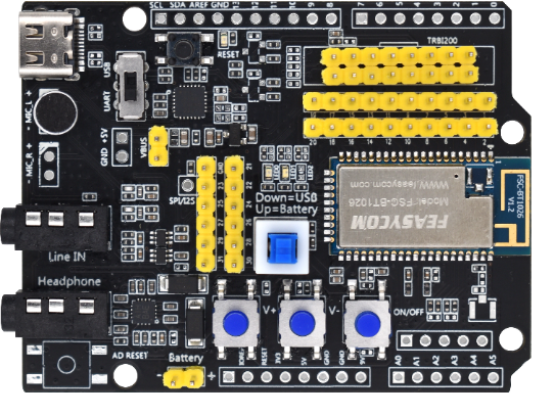
The FSC-DB200 development board integrates Type-C (including UART/USB/charging/power supply), audio input/output, microphone, lithium battery, buttons, reset button, 2.54mm pitch pin headers, status indicator lights, etc.
It can be used in conjunction with our company’s serial port assistant and AT commands for functional testing, facilitating customer familiarity with our products, reducing development cycles, and improving efficiency.”

Features

● All-in-One Type-C
● Universal 3.5mm Headphone Jack Input
● Universal 3.5mm Headphone Jack Output
● Built-in microphone for convenient call testing
● Lithium battery/USB powered
● Button controls (power on/off, pause/play, volume adjustment, track selection) and a one-key reset
● 2.54mm pitch pin headers for easy DuPont wire connections
● Multifunctional indicator lights for status indication
● RF interface (not included in the standard package) for convenient RF signal testing
● Built-in USB to serial chip
● Built-in headphone amplifier chip, capable of driving 16/32 ohm headphones
● Reserved Adafruit board connection port

Application Module

● BT1026X
● BT1035
● BT1036C
● BT1032C
● BT955
● BT958
etc

Hardware and Function

Sample Image

_images/DB200.png

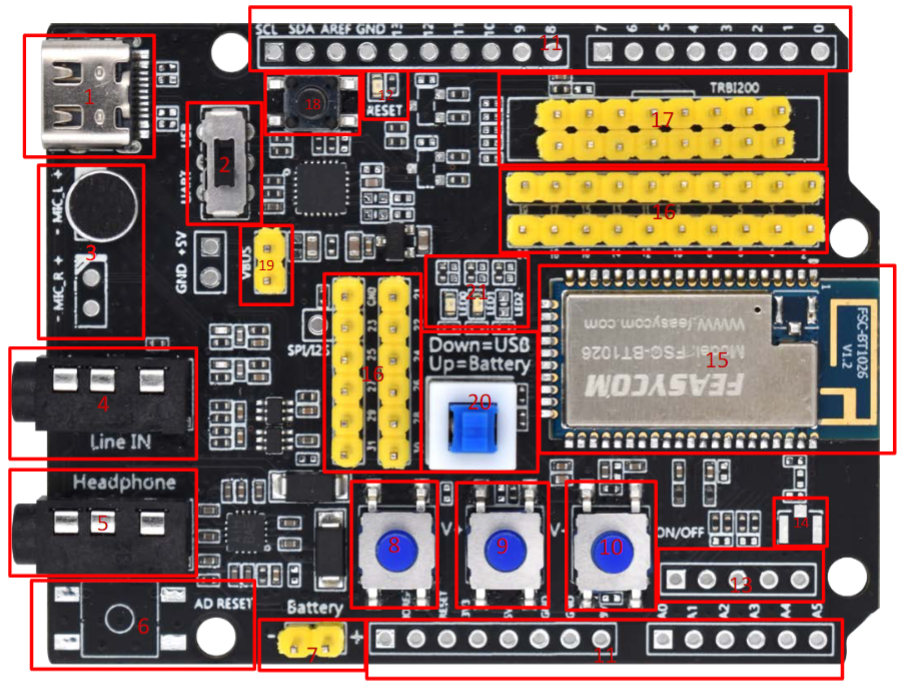
Funticon Design

_images/FSC-DB200-%E8%AE%BE%E8%AE%A1%E5%B8%83%E5%B1%80.PNG

Function Description

NO.

Description

remark

1 *

Type-C

Power the module/communicate with the module/charge the battery through the module

2

USB/UARTswitch

The UART can be selected to communicate with the module, and the USB function of the module can be selected;
Not all modules have USB capability

3

microphone

HFP (for outgoing calls, the default channel is L);
And applications that require microphones

4

Audio input

Standard 3.5mm audio socket

5

Audio output

Standard 3.5mm headphone output drives 16/32 ohm speakers up to 60mW

6

Adu board reset button

Reset the extended adu board. The default is empty

7

Battery powered

Lithium battery interface. 3.7V to 4.2V. Do not exceed the voltage, otherwise the module will be damaged

8

Volume plus

Short press Volume increase/Long press next track

9

Volume down

Short press volume decrease/Long press previous track

10

On-off key

Long press 2s switch machine;
Play music: short press pause/play;
Incoming call: Press to answer and then press to hang up

11

Adu board expansion row pin

Adu board extension, empty by default

12

Adu board indicator light

Adu board status indication

13

Analog audio differential output pin

Expansion pin, empty by default

14

External IPEX seat son

The module external antenna is connected to the seat

15

module

Can support BT1026X series/BT1035 / BT1036C/BT1032C BT955 / BT958 and so on

16

Module pin

Module each pin

17

TRBI200

TRBI200 burner interface, empty by default

18

Module reset key

Press the module to reset

19 *

Battery charging/module upgrade

Battery charging in short circuit state, module upgrade/fixed frequency

20 *

Module power supply

Short circuit: Type-C supplies power to the module;
Off: The battery supplies power to the module,
Or charge the battery when the Type-C has input voltage and the “Battery charge/Module upgrade pin” is short circuited

22

Module indicator

The blue light flashes quickly for pairing, and the long light indicates that it is connected. If the green light is steady on, the SPP/BLE connection is successful

Note

The three marked with * can be combined to achieve battery charging, and the maximum current is 200mA. Generally, this function is disabled by default. Not all modules support battery charging.

Development and Use

Driver

FSC-DB200 Uart Driver

Tools

Feasycom serial debugging assistant, is an official development of Fei Yi Tong to facilitate developers efficient and convenient desktop serial debugging tools.
For tools to download and use, visit the following links:

Feasycom serial debugging assistant download and use guide

Quick Start

Take FSC-BT1026C dual-mode Bluetooth audio module and universal firmware as an example to demonstrate the quick operation steps:

(1). Switch the development board to UART serial communication debugging mode:
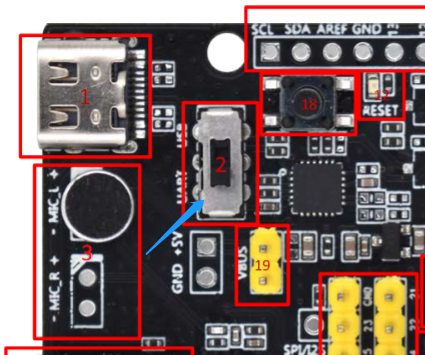
Switch the USB/UART toggle switch (component number 2) on the development board to the UART

_images/DB200-2-UART-Enable.png

(2). Connect the development board to the PC through a Type-C cable
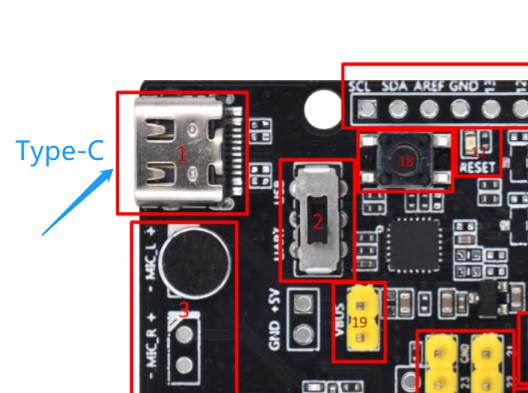

_images/DB200-1-TypeC.png

(3). After the connection, the PC recognizes the serial port COMx
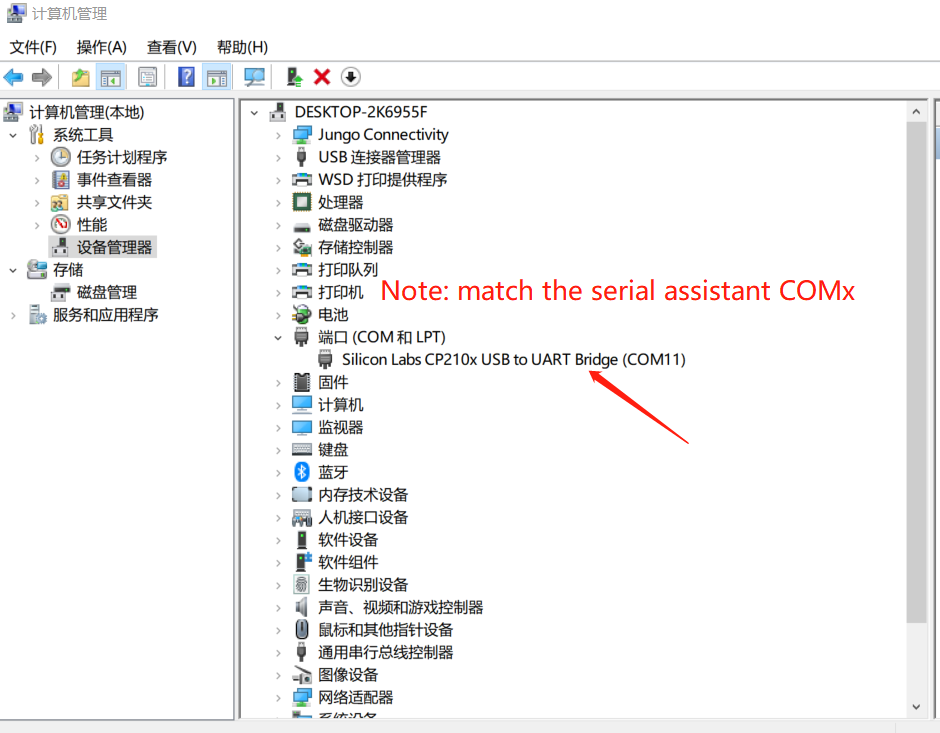
PC serial port identification:
_images/PC%E4%B8%B2%E5%8F%A3%E8%AF%86%E5%88%AB-en.png

Feasycom serial debugging assistant Serial identification:
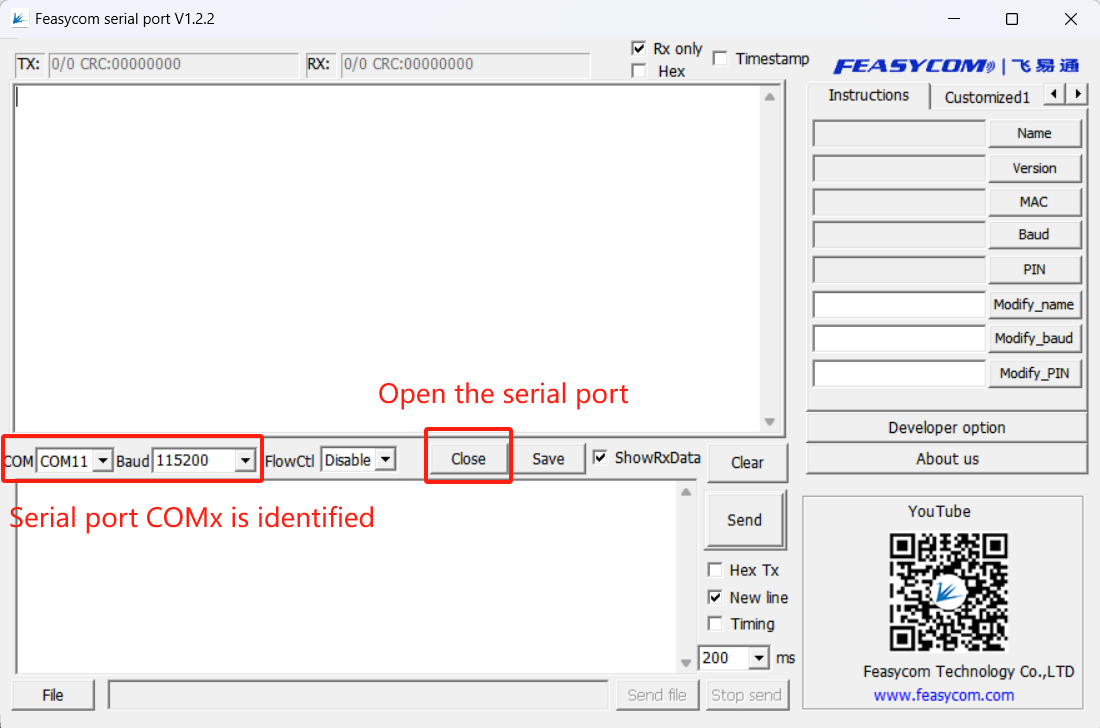
_images/%E4%B8%B2%E5%8F%A3%E5%8A%A9%E6%89%8B-COMx%E8%AF%86%E5%88%AB-en.png

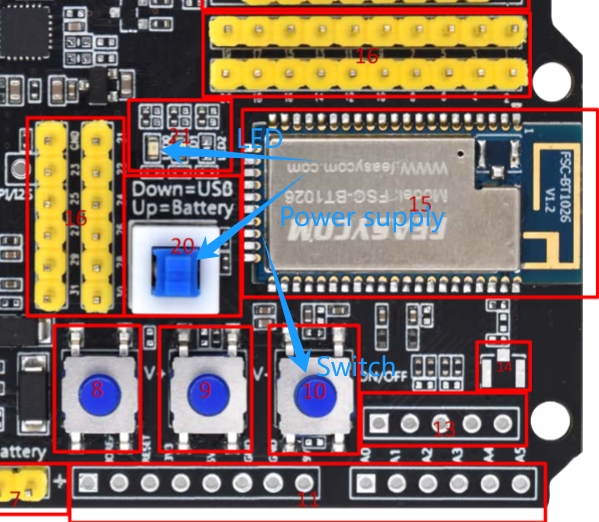
(4). The module is powered on

Press the module power supply button (component number 20) to switch to Type-C power supply (Down=USB);
Press and hold the on/off button (component number 10) for 2s;
Indicator LED00 (Component No. 21) The blue indicator blinks: The device is powered on
_images/DB200-10%2621%2620-PowerON-en.png


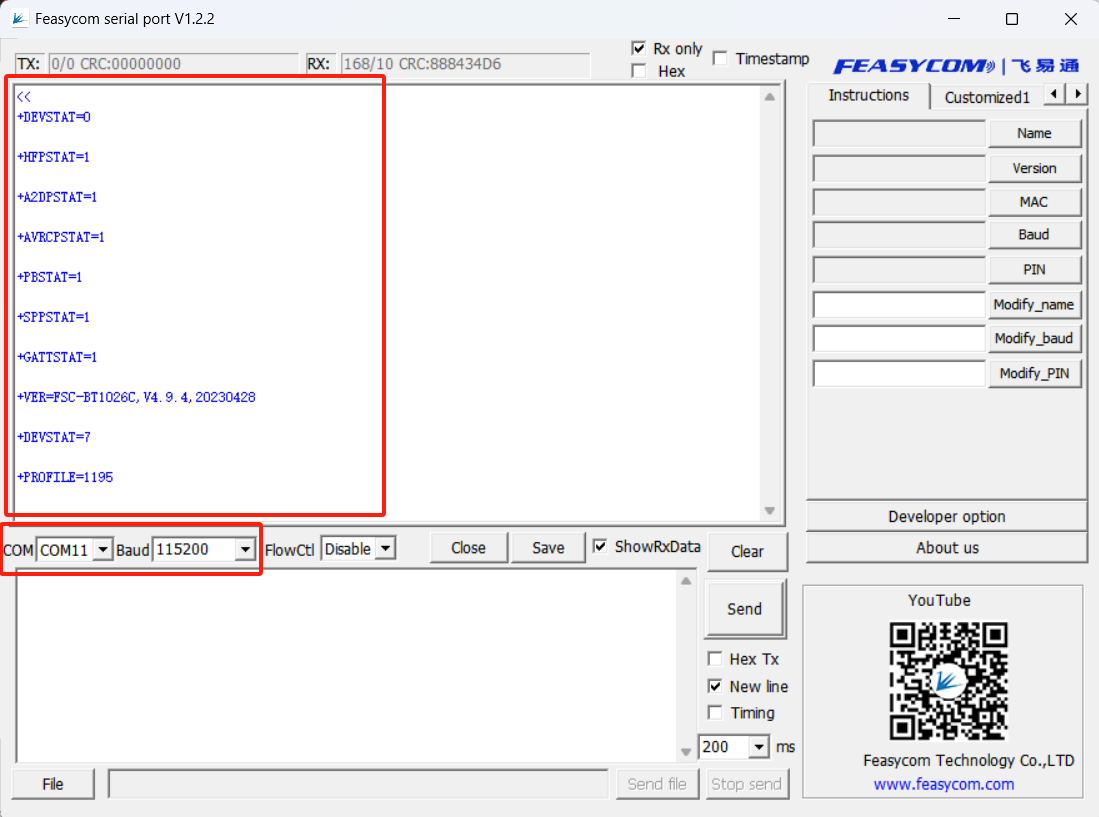
_images/%E4%B8%B2%E5%8F%A3%E5%8A%A9%E6%89%8B-%E6%8C%87%E4%BB%A4%E5%93%8D%E5%BA%94-%E4%B8%8A%E7%94%B5-en.png

This demonstration, firmware configuration, power-on response configuration data, different firmware may be different, the actual situation shall prevail.
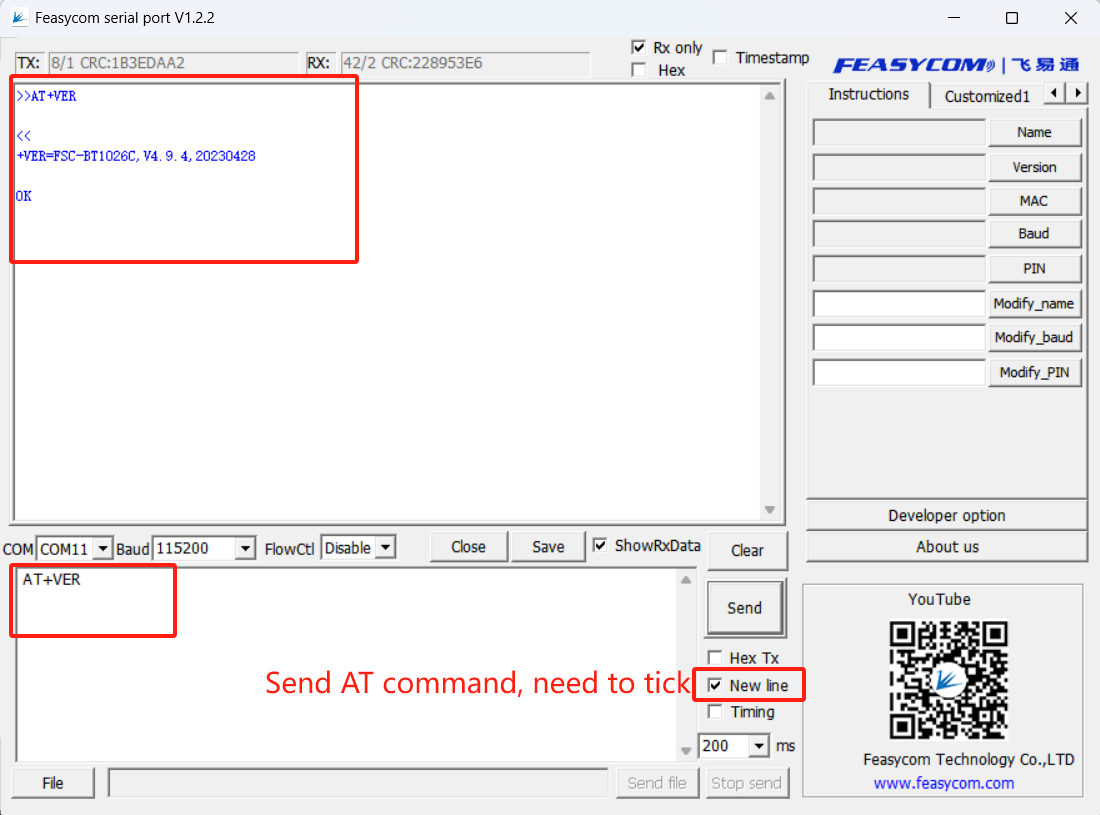

_images/%E4%B8%B2%E5%8F%A3%E5%8A%A9%E6%89%8B-AT%E8%AF%86%E5%88%AB-en.png

Supports the use of modules with AT commands, such as sending AT+VER in response to the firmware version information of the module

(4). Connect the speaker or headphones to the SPK audio output port (component number 5) of the development board through the 3.5mm AUX audio cable.
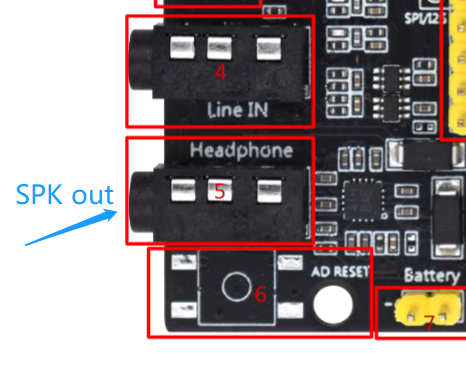

_images/DB200-5-SPK.png

(5). Scan and connect modules on the mobile phone

Serial port response +HFPSTAT=3 indicates that the HFP protocol is connected (for calls)
Serial port response +A2DPSTAT=3 indicates that A2DP is connected (for music)

(6). Music mode(A2DP)

When the phone plays music, the serial port feedback:
+A2DPSTAT=3 //A2DP connected,Mobile phone playing music
+PLAYSTAT=1
+A2DPSTAT=4
+A2DPSTAT=5 //Media streaming

(7). Call mode (HFP)

When the mobile phone makes a call, the serial port feedback:
+HFPSTAT=3 //Make a call from a mobile phone
+HFPAUDIO=1 //Create HFPAUDIO
+HFPSTAT=4
+HFPSTAT=6 //call active

AT Communication Example

@startuml
hide footbox
skinparam sequenceMessageAlign center

box  #LightBlue
participant Host as host
participant Blueware as bt
end box

rnote over host, bt: Profile initialize

bt -> host: +PROFILE=1195
bt -> host: ...
bt -> host: +DEVSTAT=7

rnote over host, bt: The phone searches for BT and initiates a connection
bt -> host: +PAIRED=2C780E805C64
bt -> host: +HFPSTAT=2
bt -> host: +HFPIBR=0
bt -> host: +HFPSIG=5
bt -> host: +HFPBATT=2
bt -> host: +HFPROAM=0
bt -> host: +HFPDEV=2C780E805C64,Honor H20
bt -> host: +HFPSTAT=3 (HFP Connected)
bt -> host: +HFPNUM=8618620277271
bt -> host: +HFPMANU=HUAWEI
bt -> host: +HFPNET=China Unicom
bt -> host: +DEVSTAT=5
bt -> host: +A2DPSTAT=2
bt -> host: +A2DPSTAT=3 (A2DP Connected)
bt -> host: +A2DPDEV=2C780E805C64,Honor H20
bt -> host: +A2DPDEC=3
bt -> host: +AVRCPSTAT=2
bt -> host: +AVRCPSTAT=3 (AVRCP Connected)
bt -> host: +AVRCPDEV=2C780E805C64
bt -> host: +PLAYSTAT=2

host -> bt: AT+HFPDIAL=10086 (dial number "10086")
bt -> host: OK
bt -> host: +HFPAUDIO=1 (audio established)
bt -> host: +HFPSTAT=4
bt -> host: +HFPCID=10086
bt -> host: +HFPSTAT=6 (call active)
host -> bt: AT+HFPCHUP (Hang up)
bt -> host: +HFPAUDIO=0 (audio release)
bt -> host: +HFPSTAT=3

host -> bt: AT+PLAY(start media player)
bt -> host: +A2DPSTAT=5(media streaming)
bt -> host: +PLAYSTAT=1(player playing)
bt -> host: +TRACKINFO=song,artist,album(track id3 info)
bt -> host: +TRACKSTAT=1,1000,240000(progress,report every secon)
bt -> host: +TRACKSTAT=1,2000,240000
host -> bt: AT+PAUSE(pause media player)
bt -> host: +PLAYSTAT=2
bt -> host: +A2DPSTAT=4

@enduml

appendix

FSC-DB200(BT1026)Schematic diagram

FSC-DB200(BT1026)Schematic diagram

FSC-BT1026 Instruction Manual

FSC-BT1026 programming user guide

Download PDF version

Download PDF version