Development Examples
Profile Initialization
Module Profile initialization, examples:
Parameter Modification
Modify Bluetooth Name
Examples: Modify Bluetooth name to CARKIT(without address code suffix) and verify it.
MCU modifying module parameters
Before the MCU modifies any parameters, it is recommended to first query, then modify, and finally verify.
For the MCU to modify the device name to CARKIT, the reference code example is as follows:
void change_name(void)
{

    uart_send("AT+NAME\r\n");
    if(uart_read("+NAME",name_buf))
    {
        if(memcmp(name_buf,"CARKIT",6))
        {
            uart_send("AT+NAME=CARKIT,0\r\n");  //defalut disable MAC address suffix
            uart_send("AT+NAME\r\n"); // read bt name
            if(uart_read("+NAME",name_buf))
            {
                if(memcmp(name_buf,"CARKIT",6))
                {
                    //change name fail
                }
                else
                {
                    //change name success
                }
            }
        }
    }
}
one-Slave-and-Two-Masters Application
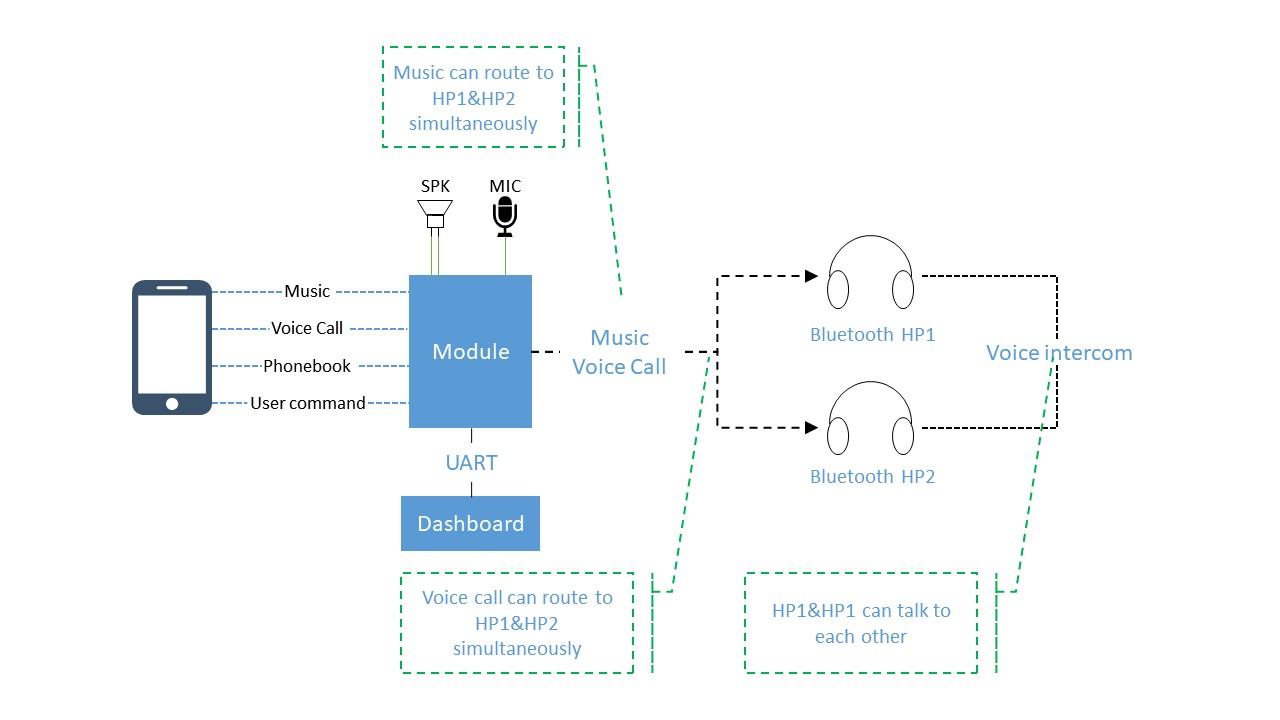
Application Block Diagram
Note
1.FSC-BT936E module integrates a transceiver and supports simultaneous operation, enabling simultaneous connection to 2 headphones and 1 mobile phone. When no headphones are connected, audio plays locally if the mobile phone plays music. When headphones are connected, the audio is automatically transmitted to the headphones.
2.Due to the high RF requirements for the Bluetooth module in this application scenario, the module’s antenna must be configured as external. Additionally, it is recommended that after the customer completes the product design of their end product, they send the circuit diagrams/PCB layouts of the Bluetooth part to Feasycom hardware department for review, and proceed with board fabrication only after confirmation of no issues.
Application Description
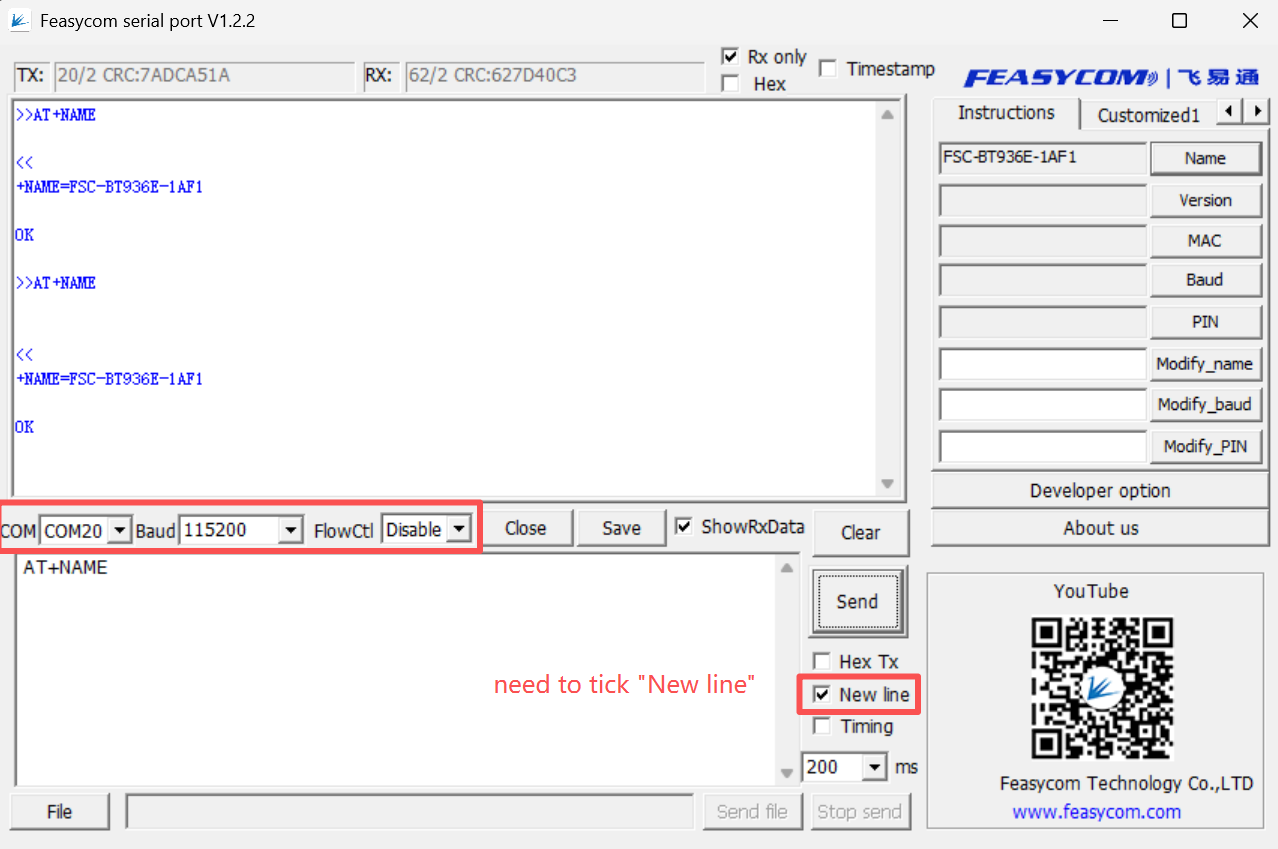
(1).Connect the development board and the PC via a Type-C cable.
(2).After connection, the PC will recognize a serial port (COMx). Examples:
(3).The mobile phone searches for and connects to the Module. Examples:
RX: +HFPSTAT=3,1,1 // Indicates that the HFP protocol is connected (for calls)
RX: +A2DPSTAT=3,1,1 // Indicates that the A2DP protocol is connected (for music)
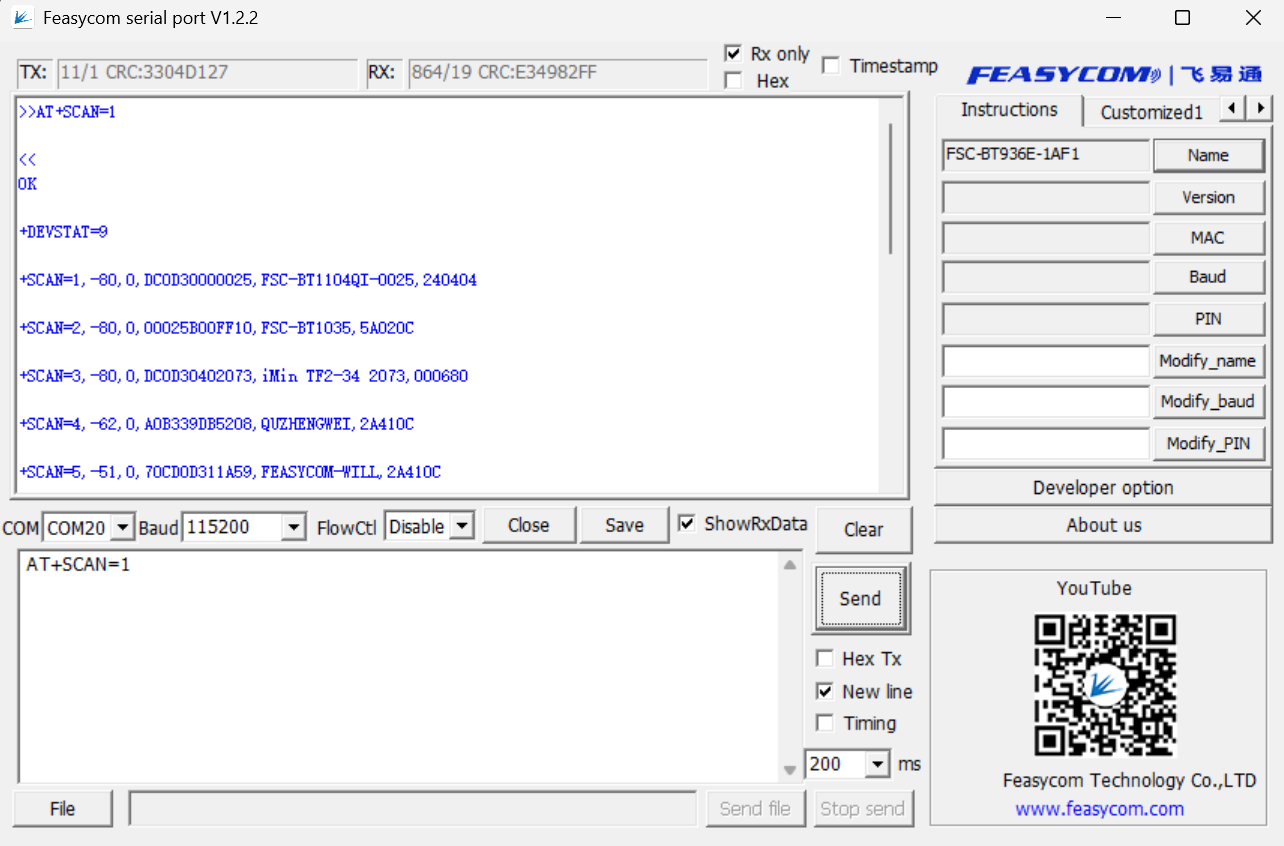
(4).Set the Bluetooth headset to be connected to pairing mode, and send AT+SCAN=1 to the Module to search at the same time. Examples:
(5).Connecting the Bluetooth Headset. Examples:
TX: AT+FOCUS=FF733EEF25E9                 // Connect the main headphone A
TX: AT+FOCUS=,B85E052670BD                //connect the secondary headphone B. "," used to separate them.
TX: AT+FOCUS=FF733EEF25E9,B85E052670BD    //Connect the headphone A and B simultaneously

RX: +A2DPSTAT=3,3,1  // Indicates that Headphone A successfully connected via A2DP
RX: +HFPSTAT=3,3,1   // Indicates that Headphone A successfully connected via HFP
RX: +A2DPSTAT=3,3,3  // Indicates that Headphone B successfully connected via A2DP
RX: +HFPSTAT=3,3,3   // Indicates that Headphone B successfully connected via HFP
Note
After the settings are configured, the Module will automatically connect to the designated headphones (it will also connect automatically after being powered on again).
(6).A2DP Music Mode:
When the mobile phone is playing music, example of the serial port response:
RX: +A2DPSTAT=5,3,3
RX: +PLAYSTAT=1
RX: +A2DPSTAT=5,5,5
(7).HFP Call Mode:
When the mobile phone is making a call and the call is ongoing with the main headset, AT command example:
Mode1: Switches to the main headphone call mode
TX: AT+AUDROUTE=2   // Switch to the main headset for the call
RX: +HFPSTAT=4,3,3
RX: +HFPAUDIO=1,0,0
RX: +HFPAUDIO=1,1,0
RX: +HFPCID=10086
RX: +HFPCIE=10086
RX: +HFPSTAT=6,6,3
Mode2: Switches to the secondary headphone call mode
TX: AT+AUDROUTE=3      // Switch to the secondary headset for the call
RX: +HFPAUDIO=1,0,0
RX: +HFPAUDIO=1,0,1
RX: +HFPSTAT=6,3,6
Mode 3: Main and secondary headphones intercom mode
Note
It supports the intercom mode between the main headset and the secondary headset, which takes effect only after the configuration of AT-HFPCFG=1 is performed.
TX: AT-HFPCFG=1
TX: AT+AUDROUTE=4
Note
If no headphones are connected, the audio will be output locally from the module when playing music.
Application Examples