Hardware Design
Module Pin Diagram
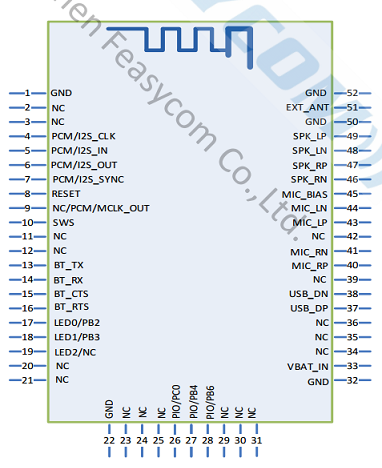
Module Pin Description
Pin |
Pin Name |
Type |
Pin Descriptions |
|---|---|---|---|
4 |
I2S_CLK |
I/O |
I2S bit clock |
5 |
I2S_IN |
I |
I2S data input |
6 |
I2S_OUT |
O |
I2S data output |
7 |
I2S_WS |
I/O |
Frame Sync Clock |
8 |
RESET |
I |
active-low reset |
13 |
UART_TX |
O |
UART TX |
14 |
UART_RX |
I |
UART RX |
17 |
LED0 |
I/O |
Bluetooth Status Indication |
32 |
GND |
GND |
GND |
33 |
VDD |
VDD |
3.3V power supply |
43 |
MIC_LP |
Audio |
Left MIC Differential Input Positive |
44 |
MIC_LN |
Audio |
Left MIC Differential Input Negative |
45 |
MIC_BIAS |
Audio |
microphone bias voltage |
46 |
SPK_RN |
Audio |
Analog Output Right Channel Negative |
47 |
SPK_RP |
Audio |
Analog Output Right Channel Positive |
48 |
SPK_LN |
Audio |
Analog Output Left Channel Negative |
49 |
SPK_LP |
Audio |
Analog Output Left Channel Positive |
51 |
EXT_ANT |
ANT |
external Bluetooth antenna |
Power-on Circuit Design
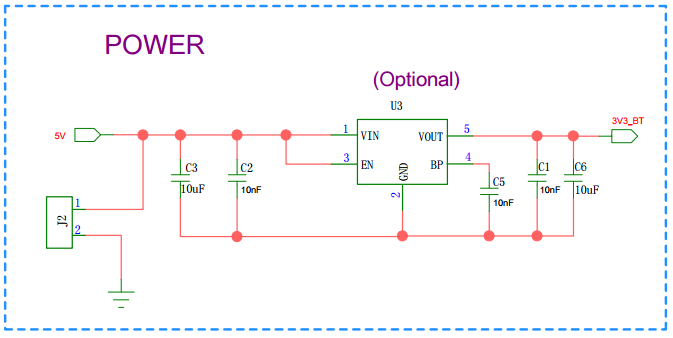
To ensure the stable operation of the Bluetooth module, the power supply for the VDD_3V3 pin must reserve a current of ≥ 300mA for the Bluetooth module.
If the power supply is converted from 5V to 3.3V, you can refer to the following optional recommended schematic diagram for design:
Antenna Note
PIN |
Description |
|---|---|
PIN51 |
To avoid signal discrepancies, external Bluetooth antenna is required |
Hardware Design Note
For the module’s simple test environment, you only need to connect VDD / GND / UART_RX / UART_TX to test and use it.
After completing the PCB circuit schematic, please contact the staff of Feasycom for review to prevent the Bluetooth range from failing to reach the optimal performance.