Hardware Design
Module Pin Diagram
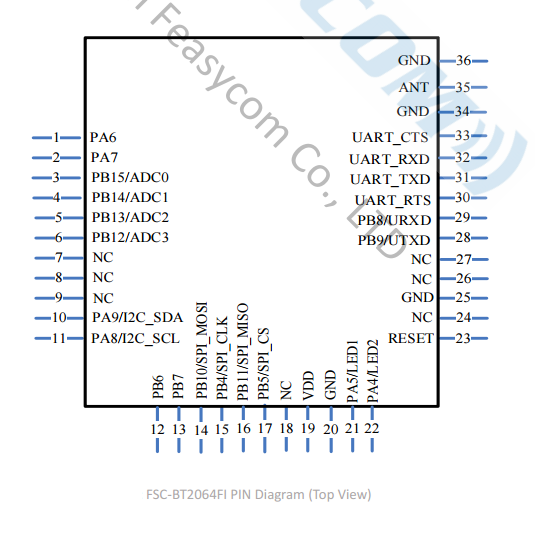
Pin Description
Pin |
Pin Name |
Type |
Pin Descriptions |
|---|---|---|---|
31 |
UART_TXD |
O |
UART Data Out. |
32 |
UART_RXD |
I |
UART Data In. |
33 |
UART_CTS |
I/O |
UART Clear to Send (active low). |
30 |
UART_RTS |
I/O |
UART Request to Send (active low). |
19 |
VDD |
VDD |
Power supply voltage 3.3V. |
20 |
GND |
Vss |
Power Ground. |
21 |
PA5/LED1 |
I/O |
LED. |
22 |
PA4/LED2 |
I/O |
BT Status. |
23 |
RESET |
I |
External reset input: Active Low. |
29 |
URXD |
I/O |
Firmware download TXD. |
28 |
UTXD |
I/O |
Firmware download RXD. |
35 |
ANT |
ANT |
RF signal output. |
Hardware Design Note
In simple test environment, the module can be used for basic testing and operation by simply connecting VDD, GND, UART_RXD, and UART_TXD.
If the MCU needs to obtain the connection status of the Bluetooth module, it needs to be connected to the STATUS pin.
After drawing the schematic diagram, please send it to Feasycom for review to avoid Bluetooth distance not achieving the best effect.