Quick Start
What you need
Required Hardware
1 x FSC-DB008-BT909C Rapid Development Kit : FSC-DB008 Rapid Development Kit pre-integrated with the FSC-BT909C Bluetooth Audio Module
1 x Windows PC
Software and Setup
Feasycom Serial Port Tool : A serial port communication analysis tool based on Windows PC.
Communication Interface : UART
UART Configuration : 115200/8/N/1
Hardware Access
1.Connect the FSC-DB008-BT909C to the PC via a USB-to-Type-C data cable. The PC will automatically recognize the serial port and generate a virtual COMx port.

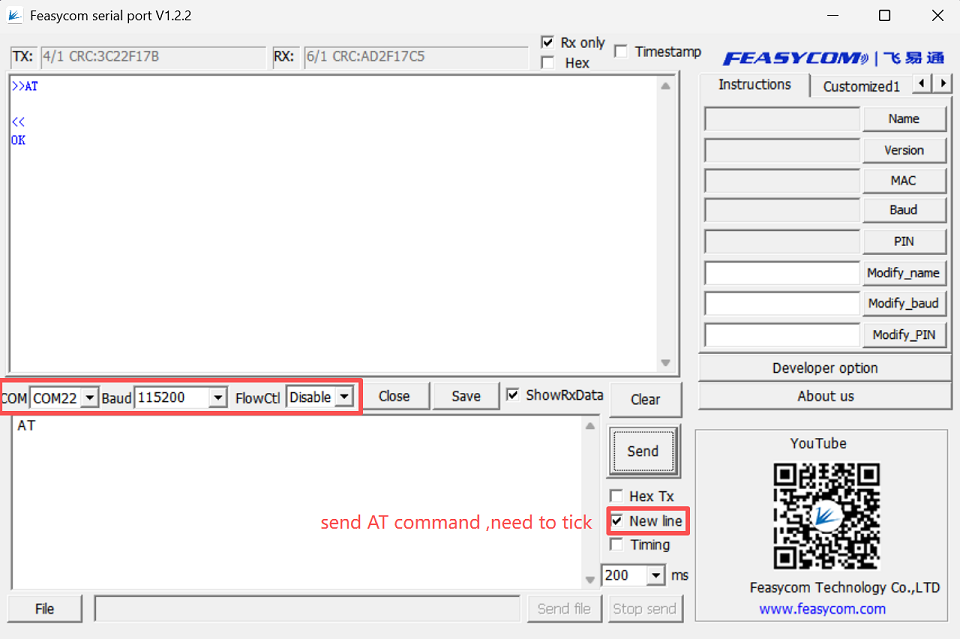
2.Run the Feasycom Serial Port Tool on the PC, set the correct COM and Baud, and check the New Line.
Communication Test
The following are several basic general AT command test examples.
For more AT commands, please refer to FSC-BT909C General Audio AT Command Set .
AT - UART Communication Test
Command |
AT\r\n |
|---|---|
Response |
\r\nOK\r\n |
Description |
Test the UART communication between HOST and Module after power on, baudrate changed, etc. |
Example:
 Send:    >>AT\r\n
 Response:<<\r\nOK\r\n
AT+NAME - Read/Write Local BR/EDR Name
Example:
Send:     <<AT+NAME\r\n
Response: >>\r\n+NAME=FSC-BT909C-0BB5\r\n   //Example, please refer to the actual reading
Response: >>\r\nOK\r\n
AT+LENAME - Read/Write Local BLE Name
Example:
Send:     <<AT+LENAME\r\n
Response: >>\r\n+LENAME=FSC-BT909C-LE-0BB5\r\n   //Example, please refer to the actual reading
Response: >>\r\nOK\r\n
AT+VER - Read the Current Firmware Version
Example:
Send:     <<AT+VER\r\n
Response: >>\r\n+VER=BT909C,V2.2.1,20230103\r\n    //Example, please refer to the actual reading
Response: >>\r\nOK\r\n