Quick Start
What you need
Required Hardware
1 x FSC-DB105-BW246 Development Kit : FSC-DB105 USB-to-Serial Port quick evaluation board integrated with FSC-BW246.
1 x Computer(Windows / Mac)
Software and Setup
Feasycom Serial Port Tool : A serial port communication analysis tool based on Windows PC.
Communication Interface : UART
UART Configuration : 921600/8/N/1
Hardware Access
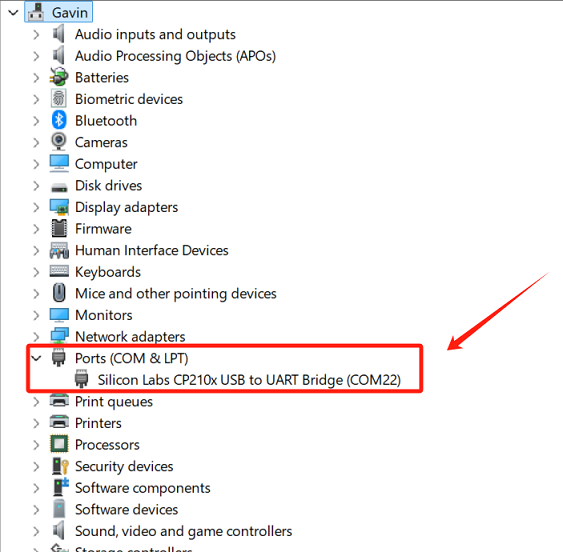
1.Connect the FSC-DB105-BW246 quick development kit to the PC via USB. The PC will automatically recognize the serial port and generate a virtual COMx port.
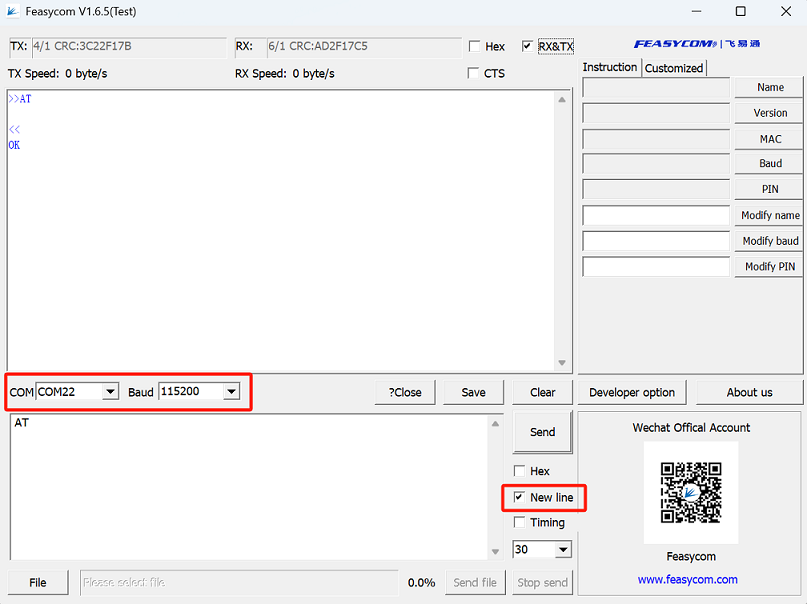
2.Run Feasycom Serial Port Tool on the PC, set the correct COM and Baud,and check the New line.
Communication test
The following lists a few basic general AT command test examples.
For more commands, please refer to FSC-BW246 General Data AT Command Set .
AT - UART Communication Test
Command |
AT\r\n |
|---|---|
Response |
\r\nOK\r\n |
Description |
Test the UART communication between HOST and Module after power on, baudrate changed, etc. |
Example:
Send:     <<AT\r\n
Response: >>\r\nOK\r\n     //successfully connected
AT+NAME - Read the BR/EDR Bluetooth name
Example:
Send:     <<AT+NAME\r\n
Response: >>\r\n+NAME=FSC-BW246\r\n      //Example, please refer to the actual reading result
Response: >>\r\nOK\r\n
AT+VER - Read the current firmware version
Example:
Send:     <<AT+VER\r\n
Response: >>\r\n+VER=FSC-BW246,V45.1.5\r\n      //Example, please refer to the actual reading result
Response: >>\r\nOK\r\n